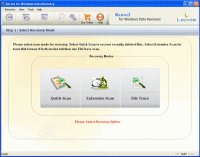
Kernel for FAT and NTFS is especially designed to help out people, who are facing data crisis and are looking for a solution to perform Windows partition recovery.
Kernel for FAT and NTFS is a professional tool for Windows partition recovery that recovers files and folders from FAT and NTFS partitions that are corrupt, deleted or formatted. Two recovery modes are available to make Windows partition recovery more efficient: Standard and Advance mode. Standard mode is suitable for Windows partition recovery in cases like recent file deletions, partition deletions, damaged and corrupt partitions due to bad sectors on disk. Advance mode helps to perform Windows partition recovery when partitions or files have deleted, formatted, or corrupted long time back. When launched Windows partition recovery software lists all the available logical drives and scans the logical drive selected by the user and displays available partitions. After successful completion of recovery process, Windows partition recovery software displays recovered files and folders, which can be saved at the desired location by the user. Windows partition recovery software supports FAT16, FAT32, NTFS and NTFS5 file systems for recovery. To understand the process of Windows partition recovery, free demo version can be downloaded. The demo version enables you to analyze the recovery steps right from logical drive selection to scanning and viewing recovered data. The only function that is not possible with demo version is saving of recovered data and to save recovered data, full version of Windows partition recovery software is required. Requirements: Pentium II 400 MHz, 64 MB RAM, 10 MB Operating system: Win95,Win98,Windows2000,WinXP,Windows2003,Windows Vista Starter Release notes: Major Update
Small freeware utility for changing the timestamp attributes of couple of files at once. Main features is include, but not limited by: recursive processing subfolders, setting date and time values for creation, modify and last access attributes.
Price: $0, Rating: 8, Downloads: 197 Download
AllSync is the professional solution for your data synchronization, backup, imaging, replication and archiving needs. AllSync offers a number of preconfigured copy modes for your synchronization/backup tasks which you can custom-adapt as needed.
Price: $24.28, Rating: 10, Downloads: 172 Download
Sprintbit File Manager for Windows XP/Vista/7 (all 32-64 bit) is a fully featured application for viewing, editing, playing and managing files, directories and archives on your computer.
Price: $33, Rating: 8, Downloads: 162 Download
User Rating
Rating:2.2 out of
5 Based on13 ratings.
13 user reviews.

 Windows Partition Recovery 11.01.01 details